
Calculate Your Move!
Instant road transport quote
How to Use the Volume Calculator?
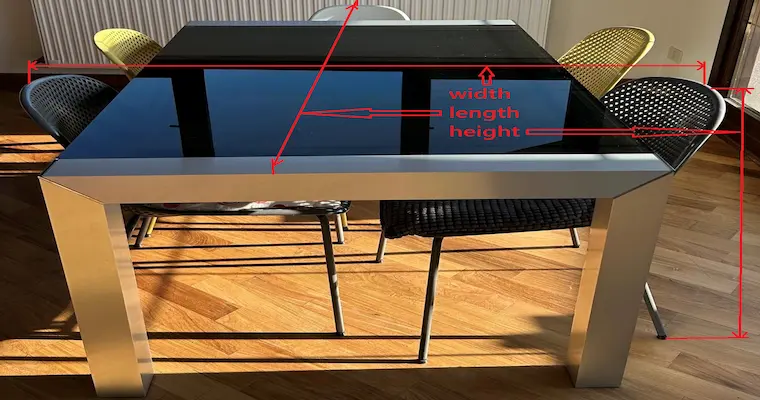
Step 1: Measure the Load Block
Obtain the volume by multiplying Length x Width x Height. Always use the most protruding points of the set (such as chair backs) to ensure the estimate is accurate.
Step 2: Adjust the Slider
In the calculator, locate the Slider. Move the button until it matches the cubic meters calculated. The price will update instantly without needing to reload the page.
Step 3: Set Origin and Destination
Select the pickup and delivery cities. The system will recalculate the cost based on the exact distance, ensuring the price you see is the final one for your specific route.
Step 4: Receive a Written Quote
Enter your email address and click the blue "REQUEST THIS ROUTE" button to receive the formalized quote. This allows you to save the price and consult it later with no obligation.
Frequently Asked Questions (FAQ) about Moving Volume
Why do we measure the chair back and not the table?
Because the back is the tallest point of the set; if we reserve space only for the table height, the chair would not fit in the truck.
Should I measure the chairs separately?
If they are placed under the table as shown in the image, measure them as a single block. If they are separate, add the individual volume of each one.
What if my measurement isn't exact?
It is always recommended to round up to avoid the truck running out of space on moving day.
Does the online calculator compute price by volume?
Yes, our calculator automatically converts your measurements to cubic meters to provide the real service cost.